- Published on
The Context Trap – Why Less is Often More
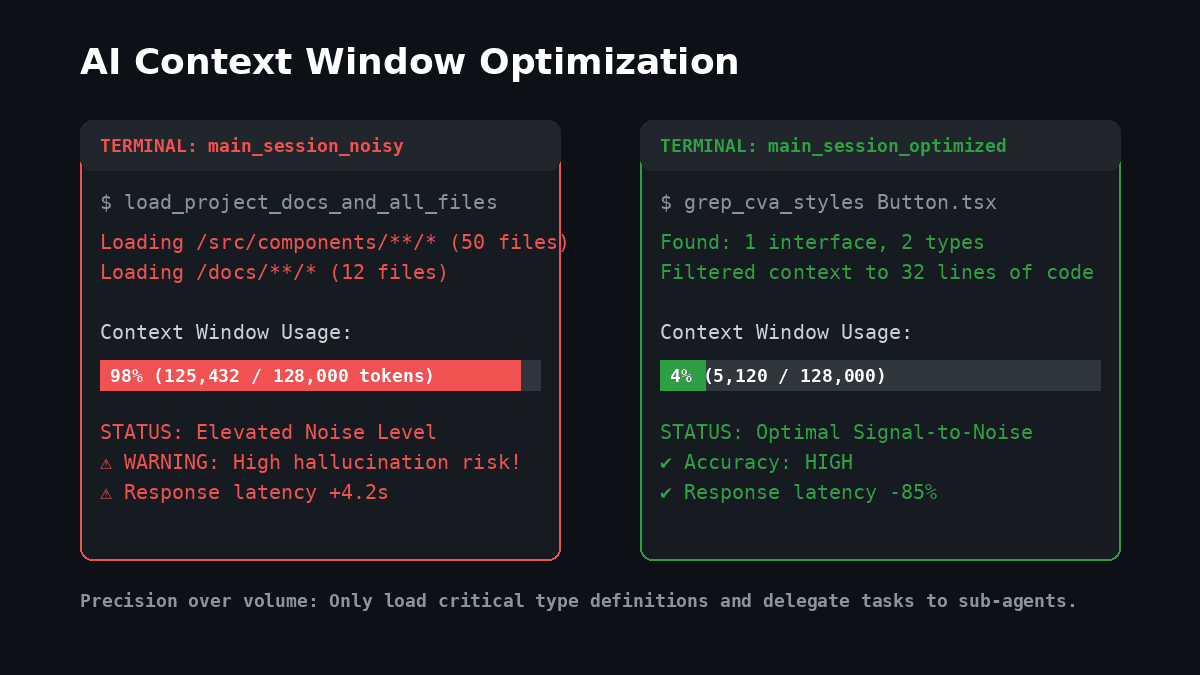
A couple of years ago, we used AI IDEs for simple, five-line edits. Today, we offload entire tasks, which has built a bad habit: the "context dump." It's that nagging feeling that if we drag our whole repository into the chat window, the model will magically understand our system architecture.
It won't. It just gets loud, hallucinates, and slows down.
Precision over volume
Component libraries are usually where this falls apart.
Say you want to tweak a button variant inside your main layout.
The sloppy way: Dragging Button.tsx, the global CSS file, your Tailwind config, and the parent dashboard layout file into the prompt.
Now the model has to process hundreds of lines of unrelated configuration, style setups, and layout markup just to change a hover state. It loses the signal. Sometimes, it tries to be "helpful" by cleaning up unrelated areas, which ends up breaking other variants.
The surgical way: Pass only the component's interface definitions and local signature.
// This is all the AI actually needs to see:
export interface ButtonProps extends React.ButtonHTMLAttributes<HTMLButtonElement> {
  variant?: 'primary' | 'secondary' | 'outline' | 'danger';
  size?: 'sm' | 'md' | 'lg';
}

export const Button = React.forwardRef<HTMLButtonElement, ButtonProps>(...)
When you feed the model exact interfaces instead of whole directories, you get clean, accurate code instantly.
The design token trap: Grep is your filter
This gets even more critical when you're enforcing a strict design token system.
If your project maps semantic tokens to tailwind classes, it's tempting to upload files like semantics.ts or typography.ts so the AI knows which colors and spacing units to use. Don't do that. It blows up your token count with setup boilerplate.
Instead, teach your AI to query a flat, auto-generated file of CSS variables using targeted commands. For example, instead of reading a 150-line theme file, tell your workspace tools to find background tokens directly:
# Verify what bg-* classes exist without opening any files
grep -n "semantic-bg" src/design-system/semanticVariables.ts
This returns just the lines the AI needs. By serving only the exact variables, your tool stays focused on the design tokens and won't accidentally invent values.
Component variants: Stop overriding
Another classic context mistake is overriding what a component already owns. If you drag a full UI file into context, the AI might generate inline styles like:
// Sloppy override:
<Button className="bg-brand px-md py-sm rounded-md font-medium text-white">Save</Button>
This is bad form. It bypasses the design token system and leads to style duplication.
Instead of opening the full component, search for the configuration block (like cva definitions) to find existing variants. Read only those 20 lines, choose the correct variant, and restrict your custom classes to layout positioning:
// Surgical variant selection:
<Button variant="primary">Save</Button>

// Allowed in className (layout positioning only):
<Button variant="outline" className="mt-md w-full">
  Cancel
</Button>
Delegate, don't dump
Trying to handle an entire complex feature in a single session is a recipe for messy code. If you are building a multi-step OTP flow, do not cram the server-side router, the client-side state, and the UI layout into one chat.
Instead of letting a single chat turn into a 100k-token monolith, break the task up.
Keep your main chat lean for high-level coordination, and spin up a separate sub-agent with its own clean context for the details. For example, give a fresh, isolated sub-agent just the raw OTP input component and a clear brief:
// Input props for the focused sub-agent task:
interface OTPInputProps {
  length: number
  onChange: (otp: string) => void
}
By isolating the client-side focus state and input handling into a clean session, the sub-agent can write the perfect hook without worrying about your API routes or middleware.
Focus is a skill
Getting better code from AI isn't about finding models with larger context windows; it's about being a better editor. If your tool keeps giving you shallow, generic responses, look at what you are feeding it.
We don't need to dump an entire library of documentation on our tools. We just need to pass the right signal. Once you prune your context, you stop wrestling with a glorified search-and-replace engine and start working with a partner that actually writes clean code.
The "Lost in the Middle" Phenomenon
Large language models often struggle as context length increases, a phenomenon research calls being "lost in the middle." While models are advertised with massive context windows, their effective performance is highest at the beginning (system instructions, core rules) and the end (the current prompt).
Information placed in the middle of a large context is often ignored or given lower priority. As you approach 50–60% of a model's capacity, recall and accuracy for middle-placed details tend to degrade.
What this means for your workspace:
- Prioritize the start and end: Keep your core instructions (like AGENTS.md and SOUL.md) at the beginning. Keep the active task and critical data at the end.
- Avoid middle clutter: If your configuration or rule files become massive, the model may struggle to parse what actually matters.
- Stay concise: Short, clear rules are more effective than sprawling documents that risk burying key directives in the "middle zone."